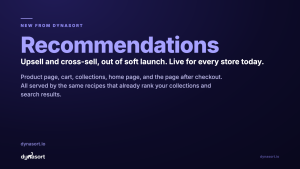
Today we are turning on the biggest thing we have ever shipped. Dynasort Search is out of soft launch and available to every store, on every plan, starting now.
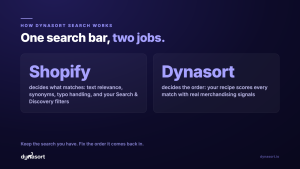
The short version: the same recipes that already rank your collections can now rank your search results and your predictive search dropdown. Shopify keeps deciding which products match a shopper’s search. Dynasort decides the order they come back in.
The problem with default search order
Type “hoodie” into most Shopify stores and the results come back ranked by text relevance: how well each product’s title and description match the word “hoodie”. Relevance is great at finding the right products. It is terrible at ordering them, because it knows nothing about your business. It does not know which hoodie is your best seller, which one is sold out in every popular size, which one just dropped, or which one carries your margin.
So your search results page shows a sold-out product in slot one and your best seller on page two. Shoppers who search are your highest-intent visitors, and default ordering treats them worse than any other page on your store.
The same search for “hoodie”
Same six matching products. Shopify finds them both times. The only thing that changes is the order.
Default order
Your recipe’s order
Best seller first, newest next, dead ends demoted to the bottom. That is one recipe. Yours can weigh sales, inventory, margin, newness, or any custom signal you build.
What Dynasort Search does
Dynasort Search re-ranks two surfaces: the search results page and the predictive dropdown that appears while a shopper types. Both are driven by a search recipe, the same kind of recipe you already use on collections, with signals like recent sales, inventory depth, newness, margin, and your own custom attributes.
The part we are most proud of is what it does not do. Dynasort Search does not replace Shopify’s search engine, and that is a deliberate choice. Shopify still decides which products match a query, which means:
- Your synonyms keep working. Anything you set up in Shopify’s free Search & Discovery app flows straight through.
- Your filters keep working. The filter definitions you configured in Search & Discovery render right on the Dynasort results page and narrow results exactly as before.
- There is no second search index to sync, no migration, and no risk of a product existing in one engine but not the other.
- Zero performance impact on your store, theme, and search results.
If a shopper searched your store yesterday, the same search works today. The only thing that changes is that the order finally makes business sense.
It looks like your store, not like a widget
Result cards support badges, color swatches, compare-at pricing, ratings, hover images, and quick add to cart, all configurable from the Dynasort admin, and all styled to be overridable with your own theme CSS. The predictive dropdown matches your theme’s look. Every serve is tracked, so you can see exactly how many searches Dynasort handled, what got clicked, and what got added to cart.
Getting started takes three steps
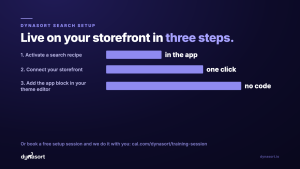
- Activate a search recipe in the Dynasort admin. Every store already has ready-made defaults waiting, including Relevant & Popular and In-Stock Bestsellers.
- Connect your storefront with one click on the Search page.
- Add the Dynasort Search app block in your theme editor and toggle the live search embed. No code, and it is just as easy to undo.
Rather do it together? Book a free setup session and we will configure it with you on a screen share, recipe tuning included.
Launch week
This is day one of a week of search content. Tomorrow we will open the hood and show exactly how the re-ranking works. Wednesday is the data: what fleet-scale search behavior says about default ordering, and how Dynasort Search compares with the other search platforms you have heard of. Thursday is a practical guide to getting the most out of search recipes and result cards.
Install Dynasort free for 30 days or read the search docs. Already a Dynasort merchant? Search is included on your plan right now, and the setup session is free.