What if you could manage your collection sorting by just asking?
If you run a Shopify store with 50+ collections, you know the drill. You log into Dynasort, scroll to find the right collection, check what recipe is assigned, maybe enable sorting on a few more, repeat. Multiply that by every seasonal shift, every new product line, every merchandising experiment. The UI is fine — but clicking isn’t always the fastest path.
The Dynasort Connector changes that.
What the Connector Is
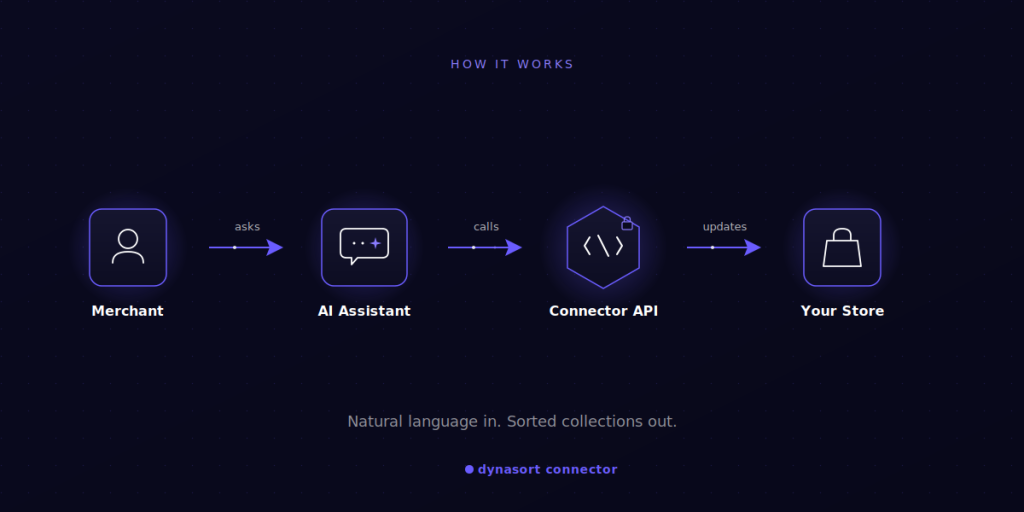
The Connector is a secure API that lets you plug Dynasort into any AI assistant — Claude, ChatGPT, or anything that supports tool use through a system prompt. Once connected, your AI assistant becomes a merchandising co-pilot. You describe what you want in plain English, and it handles the work: enabling collections, assigning recipes, triggering sorts, checking configurations, adjusting product boosts.
It’s not a chatbot bolted onto Dynasort. It’s a real API with 16 actions covering the operations you actually do most — list and update collections, bulk toggle sorting, assign recipes across many collections at once, sort or revert, manage product-level option sorting, and boost individual products in the ranking algorithm.
How It Works
Four steps to get running:
- Generate an API key on the Connector page in your Dynasort dashboard. The key is shown once and stored as a SHA-256 hash — save it somewhere safe.
- Copy the pre-built system prompt we provide. It tells your AI assistant how to use the Connector correctly.
- Paste it into your AI assistant of choice (Claude Projects, a ChatGPT custom GPT, whatever you use).
- Start a conversation. The assistant will ask for your API key on first use, then you’re off.
What You Can Actually Do
Here’s what a normal session looks like. These are real prompts the Connector handles today:
- “Enable sorting on all my summer collections using the Best Sellers recipe.”
- “What recipe is assigned to my New Arrivals collection, and when did it last sort?”
- “Set a boost of +50 on product SKU MM-HOODIE-NAVY so it surfaces higher in the lowcountry collection.”
- “Disable variant sorting on the t-shirt category — I want sizes to stay in manual order there.”
- “Re-sort the entire Sale collection right now.”
You can chain these. Ask the assistant to audit every collection that’s missing a recipe, then bulk-assign one. Ask it which collections sorted in the last 24 hours. Ask it to revert a collection to its previous order if a sort didn’t land right.
The point isn’t novelty — it’s that you stop context-switching between tabs and start operating Dynasort at the speed you think.
Security
Every key uses Bearer token authentication and is hashed with SHA-256 before storage (which is why we only show it to you once). Requests are rate-limited at 60 per minute. Revoke any key from the Connector page at any time.
Who It’s For
The Connector is included on Pro ($119/mo) and Enterprise ($249/mo) plans. It’s built for merchants who’ve outgrown clicking — agencies managing multiple stores, brands with deep catalogs, anyone whose merchandising workflow is a recurring time sink.
If you’re on Starter and most of your work happens across a handful of collections, the UI is probably still the right tool. If you’re managing dozens or hundreds, the Connector pays for itself the first week.
Getting Started
Full documentation, the system prompt, and example workflows are at docs.dynasort.io/connector.
If you’re already on Pro or Enterprise, the Connector page is live in your dashboard now. If you’re on Starter and want in, upgrade from your billing page and you’ll see it appear.
Stop clicking. Start asking.